ICD0018 Final Project
Before the defense, every ICD0018 final project is run through qa-lab — an automated grading agent that installs your Flutter app on a real Android phone, explores it on its own for about an hour, audits your source code and git history, and emails you a report. The full list of checks is in the Final Project Requirements.
To start, you must first configure your repository.
The pre-check does not decide your grade
The report you receive shows what the agent observed (screens, crashes, dead buttons, overflows) and what it found in your code. The numeric grade and the defense questions are not included in your copy — the lecturer makes the decision at the defense.
⚠️ One application per repository! The Flutter app (pubspec.yaml, lib/, android/) must be in the repository
root.
Suggested repository name:
ICD0018-flutter-final(any name works).
Configure your repository
1. Enable Instance Runners
Go to Settings → CI/CD → Runners → Expand → Instance → Turn on instance runners for this project
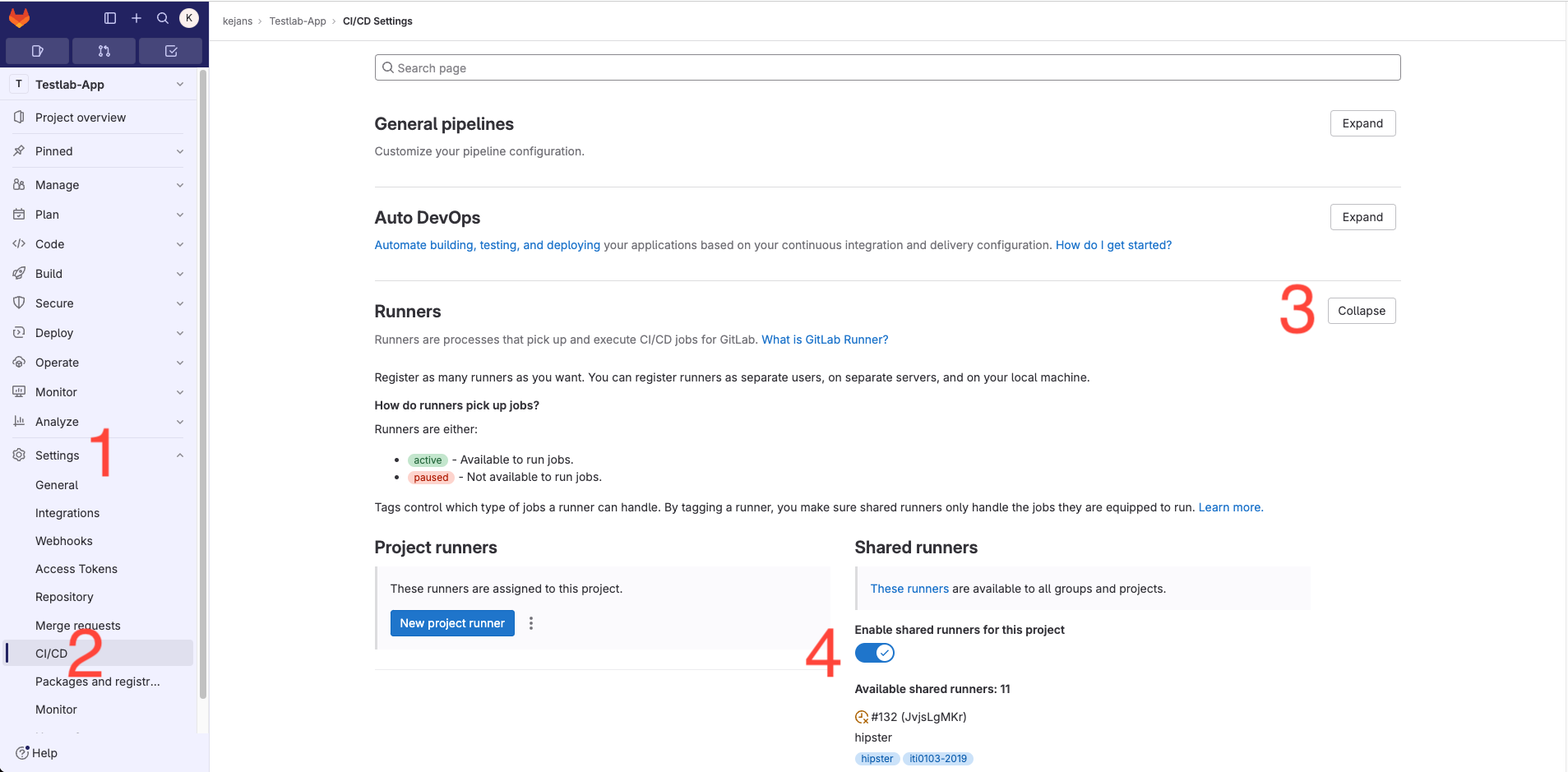
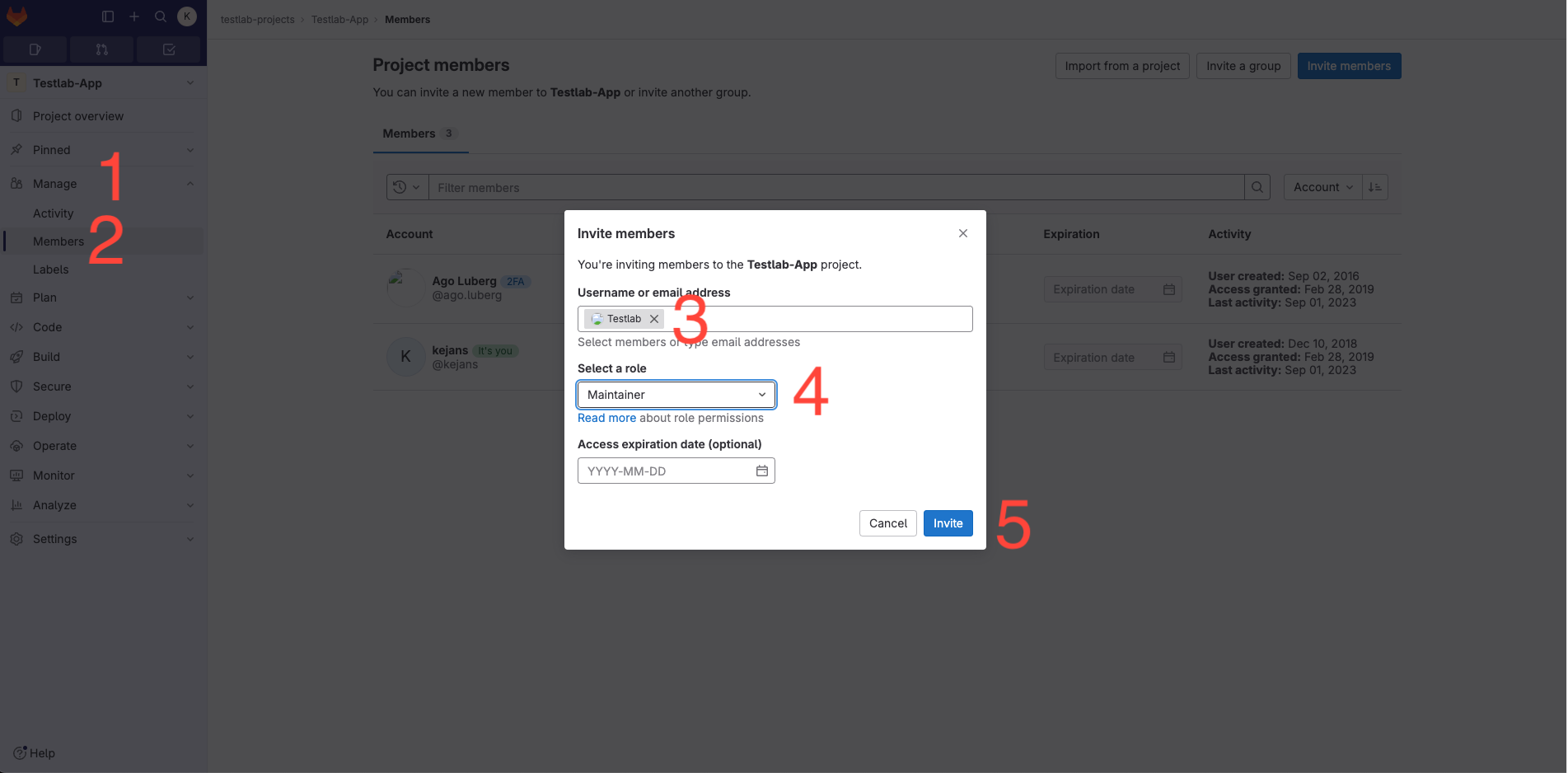
2. Add user @testlab with Maintainer permission to the repository
Navigate to Members, add @testlab with Maintainer permission, then click Invite.
qa-lab clones your repository with its full git history — without this step the pre-check fails at the clone stage.
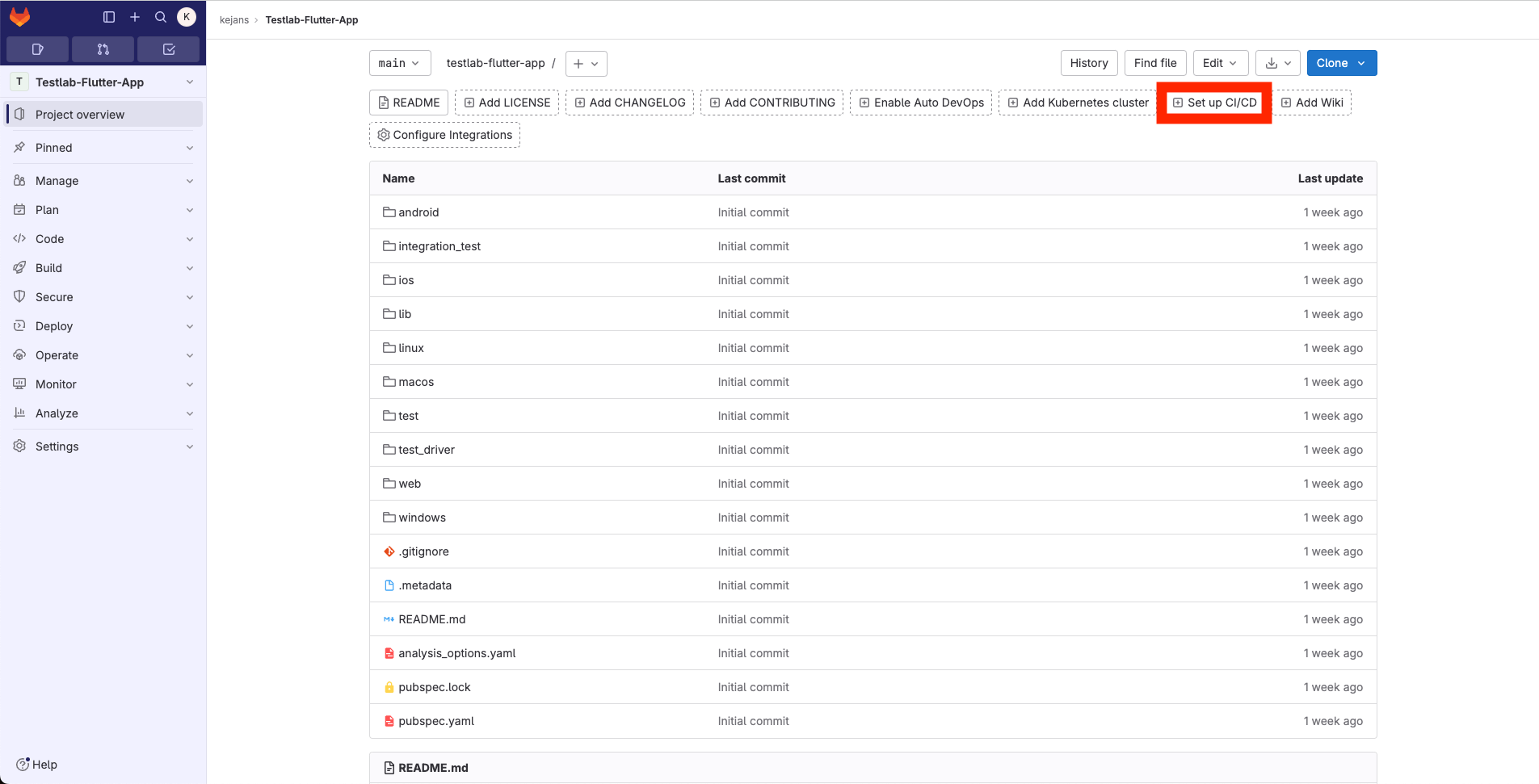
3. Commit your application source code
⚠️ Ensure there is only one app per repository.
Your repository structure should resemble the following. Then click "Setup CI/CD"
Before submitting, check that:
flutter build apk --debugsucceeds on your machine — qa-lab builds exactly that. The lab uses the newest stable Flutter; if your project needs an older release (up to about 6 months old), an older SDK is used automatically. Generated sources (*.g.dart,*.freezed.dart) do not need to be committed — ifbuild_runneris in yourdev_dependencies, the lab runsdart run build_runner buildbefore building- your README contains a working test account (email + password) that already exists in your backend. The agent logs in with it; without it, the agent only sees your login screen
- your app runs on a real Android phone, not only on an emulator
4. Add the pre-check job to your .gitlab-ci.yml
Click "Configure pipeline."
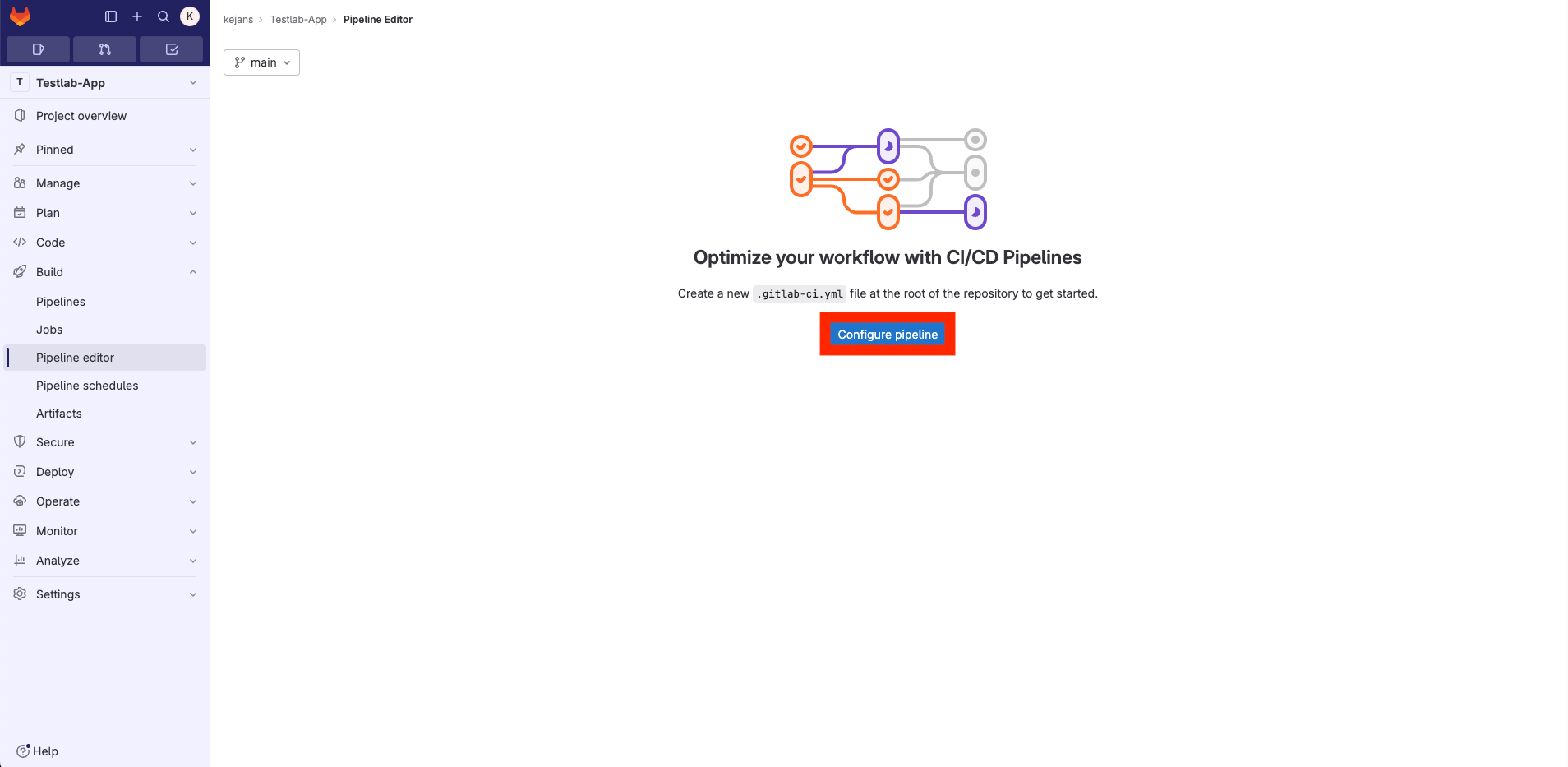
Copy the qa-lab pre-check script to your .gitlab-ci.yml, then commit it.
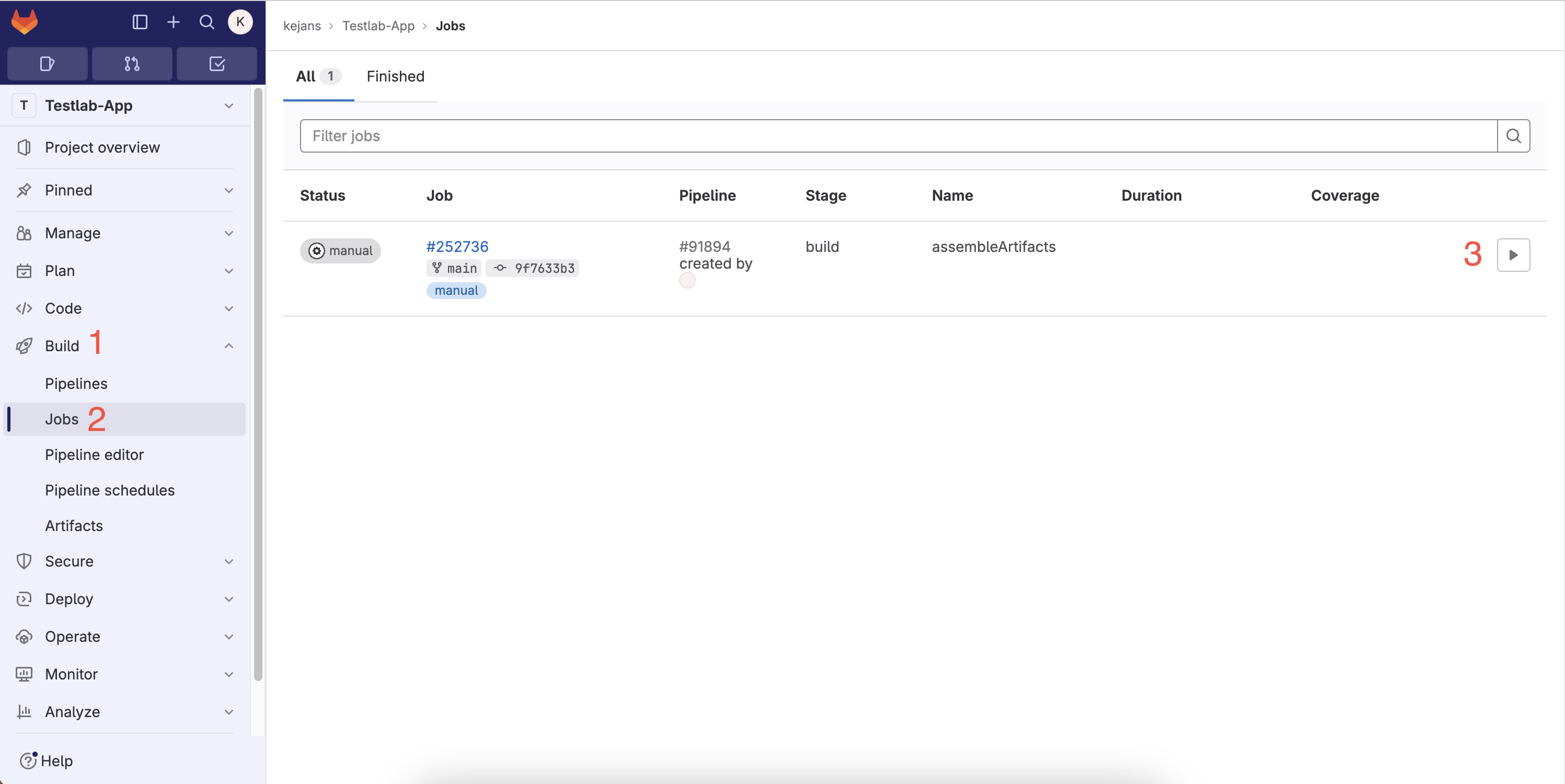
5. Next, navigate to CI/CD and initiate your job
Go to Build → Jobs and click ▶️
The job finishes in a few seconds — it only hands your repository over to Testlab. The pre-check itself then runs in the lab. Start the job again whenever you want a new report; each run tests the commit the pipeline was started from.
6. Wait for the email 📬
You'll receive the report at your UNIID email, usually 1–2 hours after starting the job. Behind the scenes:
| Step | What happens | Time |
|---|---|---|
| 1 | Testlab clones your repository (full history) | < 1 min |
| 2 | Your submission waits for a free phone — one is picked at random | 0 min – a few hours |
| 3 | flutter build apk --debug and install on that phone |
2–10 min |
| 4 | The agent explores your app autonomously | ~60 min |
| 5 | Source audit, AI code review, report generation | ~5 min |
Every submission gets its own phone, and several students' apps are tested at the same time. Close to the deadline all phones may be busy, so your submission waits in the queue a little longer. Don't wait for the last day.
If the pre-check fails (for example, the app does not compile or crashes at start-up), you get an email with the reason and the last lines of the log. Fix the problem, commit, and start the job again.
7. Congratulations, you did it! 🤩🤩
If you don't receive your results within 3 hours, contact me on Teams (Kevin Janson) or at testlab@ttu.ee.
Happy coding!!
qa-lab Pre-Check
Copy this job into your .gitlab-ci.yml. No changes are needed. The job is manual, so pushing code does not
start an hour-long pre-check every time.
qalabPreCheck:
  when: manual
  script:
    - |
      curl -X POST --location "https://testlab.taltech.ee/api/v1/startTest" \
        -F "platform=flutter" \
        -F "reportType=qalab" \
        -F "email=${GITLAB_USER_EMAIL}" \
        -F "projectUrl=${CI_PROJECT_URL}" \
        -F "repositoryName=${CI_PROJECT_NAME}" \
        -F "commitSha=${CI_COMMIT_SHA}"
The job log should end with "message":"Test job has been queued successfully".
Reading Your Report
The report is a single .html file — download it from the link in the email and open it in a web browser.
| Section | What it tells you |
|---|---|
| App summary | What the agent thinks your app does, from the screens it saw |
| Tiles | Crawl duration, actions taken, distinct screens, crashes |
| Render errors | Layout overflows (yellow/black stripes) and RenderFlex errors, with screenshots |
| Navigation graph | Every screen the agent reached and how the screens connect |
| Audit findings | Dead buttons, crashes, login problems, tap-target and contrast issues |
| Design audit | UI/UX observations per screen |
| Code review | Source checks (flutter analyze, architecture, secrets in code, git history) and AI review |
| Screens | Screenshot of every distinct screen |
Two kinds of evidence appear in the report:
- Runtime-verified — the agent saw the behaviour on the phone (a screen was reached, a crash happened, a button did nothing)
- Source-evidence — the agent found the feature in your code but could not exercise it on the phone (push notifications, real-time streams). Be ready to demonstrate these live at the defense
Use it before the defense
There are no hidden checks. An app that crawls cleanly, has no dead buttons, no overflows, a working test account and a real git history has nothing to fear from the report.
Troubleshooting
| Stage in the email | Meaning | What to do |
|---|---|---|
clone |
Testlab could not read your repository | Add @testlab as Maintainer (step 2) |
preflight |
No Flutter app in the repository root | Move pubspec.yaml, lib/ and android/ to the root |
build |
flutter build apk --debug failed |
Run it locally, fix the errors, push, start the job again |
install |
The APK could not be installed on the phone | Check minSdk and applicationId in android/app/build.gradle |
crawl |
The app was installed but could not be run | Usually a crash at start-up — run the app on a real phone in debug mode |
🔗 Check out these links 🔗
ICD0018 Final Project Requirements
How qa-lab works (lecturer's master's thesis)